A fake children's art contest link from a compromised friend, a credential-harvesting phishing page, and a daily 6:36 AM flood lockout — the full story of how my Telegram was compromised and how I traced the attacker.

Account hijacking always feels like something that happens to other people — until one morning you wake up and your Telegram simply refuses to let you in. No code. No access. Just a vague “too many attempts” message and a 24-hour lockout that resets every single day.
This is the story of how my Telegram was compromised through a fake “friend” message, how the attacker kept me locked out with a precise daily flood attempt, and how I finally figured out what was happening thanks to a critical detail Telegram hides everywhere except the web version.
The Setup: A Friendly Message That Wasn’t
It started with a message from a “friend” — someone I knew, whose account had already been compromised.
The request looked harmless:
“Hello Zhenya, please give a 👍 to Sasha Savenko”
Below it was a link to something called “Art Universe — International Art Contest 2026,” a children’s drawing competition. The link preview showed a grid of kids’ paintings and a friendly “Thank you ✌️” at the end.
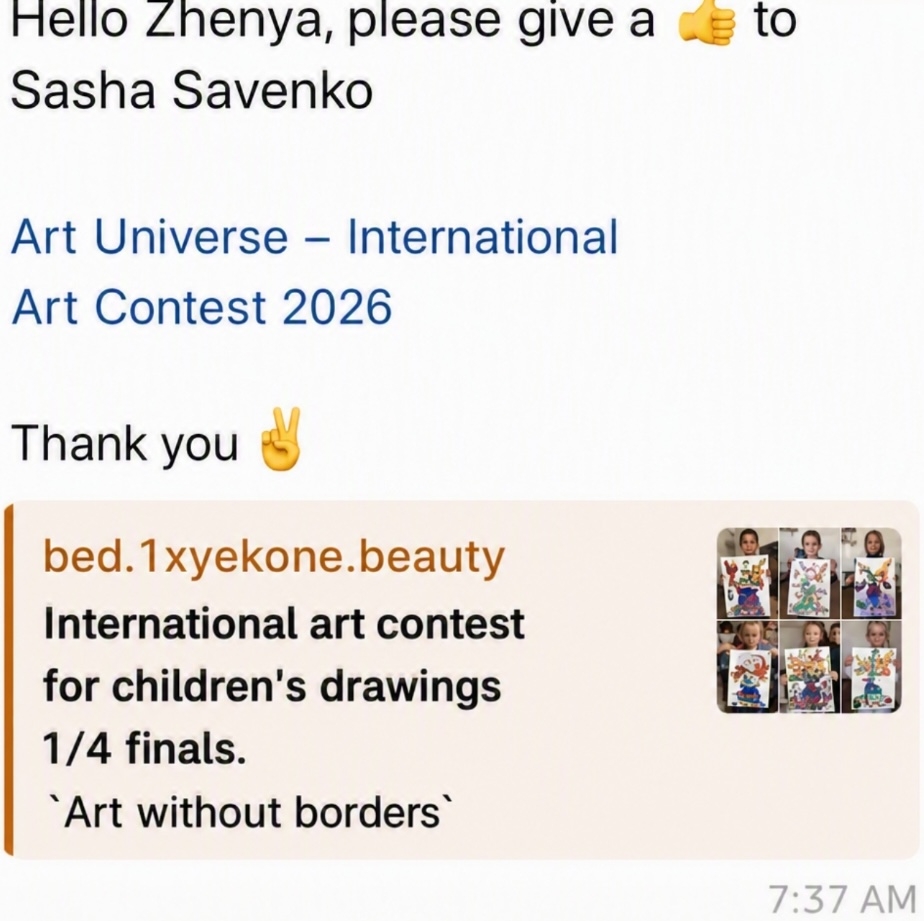
The link opened an embedded web page inside Telegram. I tapped it, and the page looked normal enough — a simple voting interface asking me to pick the best painting. But the trap was already sprung.
To “vote,” the interface asked me to verify my identity by entering my phone number. Then, it asked for the login code that Telegram sent me. Because I thought I was still inside a trusted friend’s link, I entered it.
What I didn’t realize at that moment was that this wasn’t a voting page at all. It was a sophisticated credential-harvesting phishing trap. The moment I entered that code, a script instantly handed my active session token over to the attacker. Within seconds, they had a live login inside my account and terminated my actual device sessions.
The First Sign Something Was Wrong
It wasn’t the next morning. It was a couple of days later.
That delay wasn’t accidental — it was strategic. Telegram only lets you terminate another device’s session if your session is older than theirs. The attacker had just logged in, so their session was brand new. If they had tried to kick me out immediately, I could have fought back from my older, more privileged session. So they waited — at least 24 hours — until their session had aged enough to outrank mine.
Only then did they strike. They started flooding my number with login code requests, triggering Telegram’s FLOOD_WAIT protection, and locking me out completely.
I tried to open Telegram and was greeted by a frustrating wall:
“Too many attempts. Try again later.”
I hadn’t tried anything. I hadn’t requested a login code. I hadn’t even touched the app. But Telegram insisted my number was “spamming” login requests. I assumed it was a temporary glitch. It wasn’t.
The cruel irony? If I had understood the scheme the moment I saw that first suspicious message, I could have gone straight to Settings → Devices and terminated the attacker’s session immediately — before it had a chance to age. The whole attack hinged on that 24-hour head start. If I had acted in the first day, the issue would have been solved in minutes.
The Pattern: 6:36 AM, Every Single Day
For almost 24 hours, I was completely locked out. When the lockout finally expired, I tried to log in again — only to immediately trigger the exact same block.
This frustrating loop repeated daily. The attacker was intentionally keeping me out so I couldn’t log in and terminate their malicious session.
Eventually, I turned to Telegram Web, and that’s when I uncovered the one piece of information the mobile app completely hides: the exact flood expiration timestamp.
The error code on the web interface revealed that the lockout was tied to a precise time. And that timestamp was always the same: 6:36 AM. Every single day. Down to the exact minute.
That meant the attacker had automated a script. The very second my daily penalty expired, their bot instantly spammed a fresh, broken login request to my number, triggering a brand-new FLOOD_WAIT penalty and locking me out for another 24 hours.
How the Phishing Actually Worked
It’s worth understanding the mechanics, because this is a pattern that goes far beyond Telegram.
Web pages opened inside an in-app browser cannot steal your active session token with a single tap — they’re sandboxed. Instead, this attack relied on social engineering: convincing me to voluntarily enter two pieces of information that, together, are equivalent to a full login.
- My phone number — which identifies the account.
- The login code — which Telegram sent to my real device as part of its standard authentication flow.
The phishing page forwarded both to the attacker’s server in real time. The attacker then used Telegram’s own login API to authenticate from their machine and received a valid session.
But here’s what they couldn’t do right away: kick me out. Telegram only lets you terminate sessions that are newer than your own. The attacker’s session was fresh, so mine was still senior. They had to wait — at least 24 hours — for their session to age past mine before they could terminate my device sessions and take full control.
And here’s what they never could do: change my cloud password. I had two-step verification enabled, and that extra layer stopped them dead. Without the cloud password, they couldn’t lock me out permanently, couldn’t change my recovery email, and couldn’t modify my account settings. They had a session, but they were boxed in.
The lesson: a login code is a password. Never enter it into anything other than the official Telegram app or web.telegram.org. No third-party page, no “verification,” no “contest” — nothing legitimate will ever ask for it.
Breaking the Loop
The 6:36 AM timestamp was the breakthrough. It told me two things:
- The lockout was automated, not manual — a human wouldn’t hit the exact same minute every day.
- The attacker’s script was waiting for the penalty to expire before re-triggering it, which meant there was a tiny window between the old lockout ending and the new one beginning.
Armed with that knowledge, I did the only thing I could: I emailed Telegram support. I messaged them. I waited. They never responded — not once in 10 days.
And during those 10 days of silence, the hacker wasn’t just sitting idle. They were running the exact same scheme on all my contacts — sending the same fake children’s art contest link from my compromised account, harvesting their login codes, and locking them out with the same daily flood. Every contact I had was now a potential victim, and I could do nothing but watch from the outside, unable to warn them or shut the attacker down.
So I had to take matters into my own hands. The 6:36 AM timestamp told me exactly when the attacker’s bot would strike. The lockout expired at that precise minute every day, and the bot would instantly re-trigger it. But there was a razor-thin window — the seconds between the old penalty expiring and the new request landing. If I could request my own login code in that window and enter it before the bot’s flood request hit, I’d be back in.
So I set my alarm for 6:30 AM. I sat there, phone in hand, watching the clock tick toward 6:36. The moment the lockout expired, I requested the code and entered it as fast as humanly possible — beating the bot by seconds. I was in.
And this is where two-step verification paid off a second time. Once I logged back in, the attacker couldn’t kill my session — even though their session was older. Telegram’s 2FA protects session management: terminating another device’s session requires the cloud password, which the attacker never had. So there I was, back inside my own account, and the attacker’s only remaining weapon (the daily flood) was now useless because I could see and terminate their session from my own device.
What I’d Do Differently
- Never enter a login code outside the official app. This is the single most important takeaway. The entire attack hinges on the victim handing over the code.
- If you suspect compromise, check Settings → Devices immediately. The attacker needed 24 hours for their session to age past mine before they could lock me out. If I had checked my active sessions on day one and terminated the unknown device, the entire attack would have been over in minutes. That 24-hour window is your chance to act — don’t waste it.
- Enable two-step verification (cloud password) before you need it. This is what saved my account from being completely stolen. The attacker had a live session but couldn’t change my password, couldn’t modify my settings, and couldn’t kill my session once I got back in — all because of that one extra password they never obtained.
- Be suspicious of any link from a “friend” that opens a web page. Especially one asking for phone numbers or verification codes. Compromised accounts are routinely used to phish the victim’s own contacts — that’s exactly what happened here.
- Check Telegram Web when the mobile app is unhelpful. The web version surfaces error details (like
FLOOD_WAITtimestamps) that the mobile app completely hides. Those details can be the difference between understanding an attack and being stuck in it. - Don’t count on Telegram support. I emailed and messaged them repeatedly for 10 days — they never responded. If you’re locked out, you’re on your own. Understanding the attack mechanics (like the 6:36 AM pattern) was the only thing that let me reclaim my account.
The Bigger Picture
This wasn’t a sophisticated zero-day or a targeted hack against a high-value account. It was a phishing page, a bit of automation, and a willingness to exploit a friend’s trust. That’s what makes it dangerous — it scales. The same script that locked me out at 6:36 AM every day could lock out thousands of accounts simultaneously.
Telegram’s FLOOD_WAIT system is designed to protect accounts from brute-force attacks. In this case, the attacker weaponized it against the account owner — turning a security feature into a lockout mechanism. The 24-hour penalty that’s meant to stop attackers became the tool that kept me out while they retained control.
If you take two things from this story: treat every login code like your house key — don’t hand it to a stranger just because a friend’s message told you to. And enable two-step verification right now — it’s the one thing that stood between me and total account loss.
Welcome to The infinite monkey theorem
Somewhere a monkey just typed Shakespeare in TypeScript. Be the first to read the masterpieces (and the hilarious misfires) landing on the blog.